
Real Plans - Meal Planner
Real Plans Inc.Food & Drink
4.4181.00 Reviews
- Version
- 9.19.0
- Installs
- 50.00K
- Age Rating
- Everyone
Screenshots



Our Review of Real Plans - Meal Planner
 Analysis by Appyee
Meal planning sounds simple until a busy week turns a fridge full of ingredients into a nightly guessing game. I like the idea behind Real Plans - Meal Planner: make decisions before hunger takes over, then use that plan to guide cooking and shopping. It is a Food & Drink app from Real Plans Inc., and its focus is home cooking rather than restaurant discovery or calorie logging. That makes it most appealing to people who want a practical routine, though it is less compelling if you already enjoy improvising dinner or mainly want a basic checklist.
The first useful question is not whether an app can suggest meals, but whether it can fit the way a household actually eats. Real Plans is built around preferences and planning, so it makes sense for cooks managing dietary choices, multiple people, or a week that rarely follows the same schedule twice. I would approach it as a planning aid, not a promise that every meal will be effortless: you still need to choose what suits your time, shop for it, and cook it.
Planning that connects recipes to the week
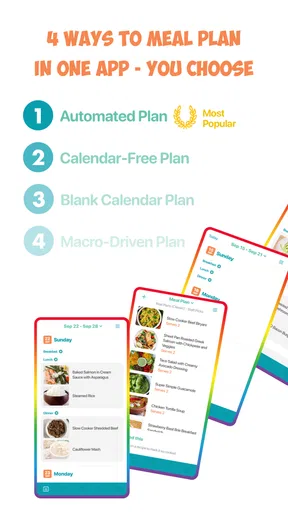
Meal-planning apps often fall into two camps: recipe collections that leave you to organize everything, and simple calendars or notes where you must build the plan yourself. Real Plans aims to bridge those jobs by pairing meal choices with a grocery list. That link is its most persuasive idea. A recipe is more useful when it has a place in your week and the ingredients can be carried into a shopping trip.
There is a trade-off in that approach. The more an app tries to structure meals, the more time you may spend setting up preferences and adjusting a plan before it feels personal. Someone who cooks from memory and buys groceries spontaneously may find a paper list quicker. But if you regularly buy ingredients without deciding how they will be used, planning can help reduce that last-minute scramble.
Getting Started with Real Plans
When I first downloaded Real Plans, I was intrigued by the promise of customized meal plans that fit my dietary needs. Setting it up was surprisingly simple. The app asks a few questions about your diet preferences, allergies, and how many people you’re cooking for. Whether you’re vegan, gluten-free, or a die-hard carnivore, there’s something for everyone.
What I loved right off the bat was the user-friendly interface. It’s clean, intuitive, and doesn’t overwhelm you with too many options at once. Plus, there’s a nifty feature where you can sync the app with your grocery store’s inventory. Talk about convenience!
In practical use, I would treat those early choices as a starting point rather than a permanent rulebook. Household preferences can be uneven: one person may avoid an ingredient while another is happy to eat it, and a plan that works on a quiet weekend may not suit a packed weekday. Reviewing the plan before you shop is a sensible habit. It gives you the chance to catch meals that feel too ambitious and substitute something more manageable before the shopping list becomes the default.
A useful way to test whether the setup is helping is to plan only the meals you genuinely expect to cook. Filling every slot can look organized but may create waste if plans change. Leaving room for leftovers, an easy pantry meal, or an unplanned evening makes the schedule more realistic. This kind of restraint matters more than having a perfectly filled calendar: the best plan is the one you can follow without resenting it.
Features That Stand Out
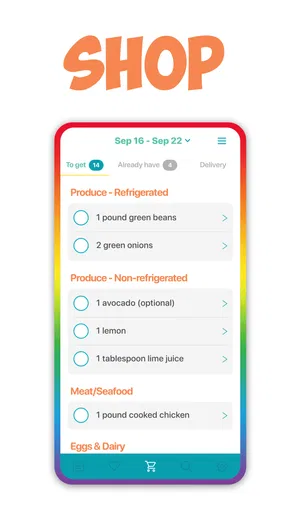
One of the coolest parts of Real Plans is the automatic grocery list. I mean, who doesn’t love having their grocery list magically generated? It updates instantly as you add or remove meals, which is a huge time-saver. The list is organized by aisle, making your shopping trip a breeze. No more zigzagging across the store!
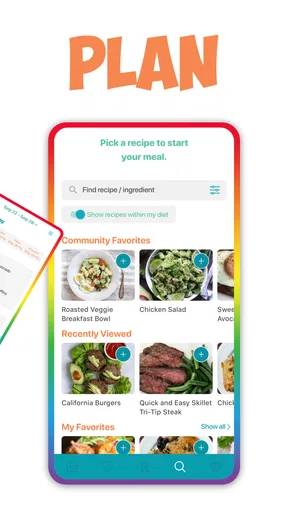
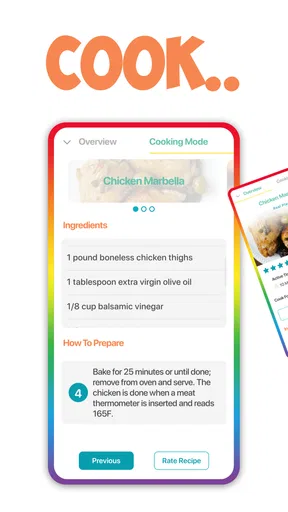
The recipe database is another gold mine. With over 1,500 recipes, boredom is not an option. You can filter recipes based on prep time, ingredients, or dietary preferences. I found myself discovering new dishes I wouldn’t have thought to try otherwise. Plus, the step-by-step instructions are clear and easy to follow, even for those who aren’t exactly Michelin-star chefs.
The grocery list is especially useful when you make a change late in the week: removing a planned dish should keep the shopping plan aligned with what you intend to cook. I would still scan the list before heading out. A generated list is a convenient draft, not a substitute for checking what is already in your cupboards or deciding whether you need a full package of an ingredient for one recipe. That quick review can prevent duplicate purchases and help you use up food already on hand.
Recipe discovery also works best when you treat filters as a way to narrow choices, not as a guarantee that every result suits your kitchen. A short prep-time filter can help on a work night, while ingredient-based browsing is handy when you have something perishable to use. If you are new to planning, I would start with familiar dishes and add one unfamiliar recipe at a time. That keeps shopping and cooking predictable while still making the week feel less repetitive.
Customizing Your Meal Plan
Real Plans shines in its customization options. You can tweak your meal plan to fit your schedule, so if you know you’re going to be busy on Wednesday, you can opt for a quicker meal. The app also allows you to input your own recipes, which is perfect if you have family favorites you want to include.
I particularly appreciated the flexibility in adjusting serving sizes. If you’re hosting dinner for friends, it’s easy to scale up a recipe. On the flip side, you can cut down a recipe if you’re just cooking for yourself. It’s all about making the app work for you.
That flexibility points to a less obvious strength: a plan does not have to be a fixed menu. You can use the schedule as a framework, moving a quick option to the evening you expect to be tired and saving a more involved recipe for a day with breathing room. Adding a familiar family dish can also make the plan more likely to survive contact with real life. I would avoid entering every recipe at once; start with the meals you repeat often, then add others when you have a reason to plan them.
Serving adjustments are handy, but scaling a recipe does not remove the need for judgement. Cooking time, pan size, and seasoning do not always change in a perfectly simple way when a batch gets larger or smaller. For a first attempt at a dish, I would follow the cooking cues as well as the quantities, especially when serving guests. The app can help organize the amount; the cook still decides when the food is ready.
Integration and Support
The integration with other apps is seamless. You can sync with your calendar to keep track of your meal plans and shopping days. And if you’re using a fitness app, Real Plans can integrate with it to help you track your nutritional intake. It’s like having a personal nutritionist in your pocket.
The customer support is top-notch. I had a minor hiccup trying to sync with my calendar, and their response was both quick and helpful. They even followed up to ensure everything was running smoothly. It’s little things like this that make a big difference.
For an ordinary week, the most useful workflow is to plan around commitments rather than treat the calendar as decoration. If Tuesday is crowded, schedule something quick; if a free evening appears later in the week, put the recipe that needs more attention there. Then use the grocery list as the bridge between planning and shopping. This is more practical than trying to cook a new recipe every night, and it leaves room for a meal to move without forcing you to rebuild the whole week.
Calendar or fitness connections may appeal if you already use those tools, but they are not the reason I would choose a meal planner. If your only goal is knowing what to cook, the recipe plan and shopping workflow matter more. If you want detailed nutrition tracking, check whether the connected tools suit your needs before making that a central part of your routine; a meal planner should not be mistaken for individualized dietary advice.
Where it fits—and where it does not
I would recommend trying Real Plans if you cook at home regularly and want help connecting recipes, dietary preferences, and shopping into one routine. It may be particularly useful for a household where one person usually carries the mental load of deciding dinner. A shared plan can make the week easier to discuss, even if one person still does most of the cooking. It also suits someone who wants to broaden their repertoire but prefers to browse recipes with practical filters rather than search the open web every evening.
Consider a Sunday evening when you know the coming week includes late workdays and one dinner with guests. You could place the simplest meals on the busiest nights, keep a familiar favorite for the evening when everyone is tired, and reserve the more interesting recipe for the night you have time. After that, check the shopping list against your pantry and adjust servings for the guests. The value is not that the app cooks for you; it is that these decisions happen before you are hungry and pressed for time.
By contrast, someone who buys groceries day by day, rarely cooks recipes, or prefers to decide dinner based on whatever looks good may get more structure than they want. A notes app or a handwritten list can be a better fit if all you need is a reminder to buy a few items. Likewise, cooks with strict medical nutrition requirements should verify recipes and ingredients carefully rather than relying on preference settings alone. Personal needs can be specific, and a general planning tool cannot replace professional guidance.
Price is worth weighing before building a routine around it. The app is free to download, but it offers in-app purchases ranging from $0.99 to $144.99 per item, so I would check what is included in the option you are considering rather than assume every planning feature is free. Its average rating is 4.5 from 474 ratings, with 178 written reviews, and it has 50K+ installs. Those figures suggest a well-used app, but they do not tell you whether its approach suits your cooking habits.
Practical details before you commit
Real Plans is rated for Everyone, and its current version is 9.15.0; it was released on Oct 8, 2015, and requires Android 7.0 or later. Those details make it easier to check basic compatibility, but I would still think about your own device and household routine before planning around it. If you share cooking with someone, agree on who will maintain the plan and shopping list; a plan that only one person updates can become stale as soon as the week changes.
One common question is whether a meal plan can cope with unexpected changes. The practical answer is to treat the schedule as editable: move a recipe, use leftovers, or swap in a quicker option rather than forcing the original plan. Another is whether it can replace a grocery-store app. I would not assume that. Its value here is organizing ingredients around meals; for store-specific ordering or a shopping workflow you already rely on, your existing retailer tool may still be more convenient.
People also wonder whether they need to be confident cooks to benefit. Clear recipe steps can make unfamiliar dishes less intimidating, but planning itself is useful even if you keep most meals simple. Start with a small number of recipes you know you can manage, then expand only when the process feels comfortable. That approach makes it easier to judge whether the app is reducing effort or merely adding another thing to maintain.
Final Thoughts
So, is Real Plans - Meal Planner worth it? Absolutely. It’s a game-changer for anyone looking to streamline their meal prep and eat healthier without the hassle. It’s not just an app; it’s a lifestyle upgrade. You’ll find yourself saving time, money, and maybe even discovering a newfound love for cooking.
Whether you’re a busy professional, a parent juggling family meals, or just someone who wants to eat better, Real Plans offers a solution that’s both practical and fun. So go ahead, give it a try, and say goodbye to mealtime stress. Bon appétit!
My verdict is positive, with a clear qualification: Real Plans makes the most sense when you want a repeatable system for choosing meals and turning them into a shopping plan. It is not a magic fix for a chaotic week, and it asks you to participate by checking, adapting, and cooking. But if you are tired of starting dinner decisions from zero, that small amount of preparation can be worthwhile. I would try it for a week of realistic meals—not an idealized menu—and keep using it only if the planning feels lighter than the guesswork it replaces.
Verdict
Strengths of Real Plans - Meal Planner
- Customizable meal plans for any diet.
- Extensive recipe database included.
- User-friendly interface with clear instructions.
- Grocery list auto-generates based on plans.
- Syncs seamlessly with calendar apps.
Limitations of Real Plans - Meal Planner
- Subscription required for full features.
- No offline access for recipes.
- Limited integrations with fitness apps.
- Some recipes lack detailed nutritional info.
- Occasional sync issues with calendar.
Similar Picks in This Category
View All
Rappi: Food Delivery, Grocery
Rappi, Inc - Delivery3.5

McDonald’s: Cupons e Delivery
Arcos Dorados4.3

Swiggy: Food Instamart Dineout
Swiggy4.7

Blinkit: Groceries & more
Blinkit4.8

foodpanda: food & groceries
Foodpanda GmbH a subsidiary of Delivery Hero SE4.0

Zomato: Food Delivery & Dining
Zomato4.7
Frequently Asked Questions
What features does the Real Plans app offer?
Real Plans is a comprehensive meal planning app designed to simplify weekly meal prep. It includes customizable meal plans, a vast recipe database, and a grocery list generator. Users can adjust meal plans to suit dietary preferences, including vegetarian, vegan, gluten-free, and more. It also syncs across devices for easy access.
Is Real Plans suitable for families or individuals with dietary restrictions?
Yes, Real Plans is highly adaptable for families and individuals with dietary restrictions. It allows users to input specific dietary needs, such as gluten-free, paleo, or dairy-free, and generates meal plans accordingly. The app also offers portion adjustments to cater to different family sizes.
Can I integrate my own recipes into Real Plans?
Absolutely. Real Plans allows users to add personal recipes alongside the app’s existing database. This feature enables users to maintain favorite family recipes while enjoying the convenience of automated meal planning and shopping list creation. Users can input ingredients and instructions to seamlessly integrate personal recipes.
How does Real Plans help with grocery shopping?
Real Plans simplifies grocery shopping by generating a detailed shopping list based on your selected meal plan. The list is categorized by grocery aisle, making it efficient for in-store shopping. Additionally, users can edit the list, add personal items, and even sync it with certain online grocery services for direct ordering.
Does Real Plans require an internet connection to function?
While an internet connection is needed for initial setup and syncing across devices, Real Plans offers offline access to meal plans and grocery lists. This allows users to view their plans and lists without needing a constant internet connection, making it convenient for planning on the go.
